MAKEBLOCK P1030065 Halocode Standard Wireless Single Board 6928819509269 Kit
( Brand: Makeblock ), ( Manufacturer Part Number: P1030065 ), ( Part Type: Board Kit ), ( UPC: 928819509269 )
Review MAKEBLOCK Halocode Standard Kit Wireless Single Board Computer New
The **Makeblock HaloCode Standard Kit (Wireless Single Board, Model P1030065)** is an innovative and versatile educational tool designed to bridge the gap between coding and hands-on robotics, making it an ideal choice for both beginners and advanced learners. This kit combines the power of the **HaloCode wireless single-board computer** a compact yet feature-rich microcontroller with a comprehensive set of modular components, enabling users to build, program, and control interactive projects with ease. At its core, the HaloCode board integrates a **high-performance ESP32 processor**, delivering robust wireless connectivity via Bluetooth and Wi-Fi, along with ample memory and GPIO pins for seamless integration with sensors, actuators, and other electronic modules. Its sleek, single-board design ensures portability and simplicity, making it perfect for classroom settings, maker spaces, or personal experimentation.
The kit includes a diverse range of **pre-assembled modules**, including motors, servos, ultrasonic sensors, light sensors, and LED matrices, all designed to snap together effortlessly using Makeblock s proprietary **plug-and-play connectors**. This modular approach eliminates the need for soldering or complex wiring, allowing users to focus on creativity and problem-solving rather than technical hurdles. The accompanying **HaloCode software**, compatible with both Windows and macOS, features a user-friendly **block-based coding environment** inspired by Scratch, as well as an option for Python programming, catering to learners of all ages and skill levels. Whether building a responsive robot, an interactive light display, or a smart home prototype, the kit s intuitive drag-and-drop interface empowers users to visualize and execute their ideas with minimal frustration.
Beyond its educational value, the **HaloCode Standard Kit** fosters critical thinking and collaborative learning through its project-based curriculum. The included **step-by-step tutorials and project guides** cover a wide array of applications, from basic motion control and sensor integration to advanced wireless communication and AI-driven interactions. For instance, users can program a robot to navigate obstacles using ultrasonic feedback, create a weather station that transmits data wirelessly, or develop an automated plant monitoring system that adjusts watering schedules based on soil moisture levels. The kit s emphasis on **open-ended experimentation** encourages creativity, while its wireless capabilities such as Bluetooth Low Energy (BLE) and Wi-Fi enable seamless integration with smartphones, tablets, or cloud platforms for remote control and data visualization.
Safety and durability are also key considerations in the design of this kit. The components are constructed from high-quality, child-safe materials, and the HaloCode board itself is designed to withstand everyday use without compromising performance. Additionally, the kit s **expansive compatibility** with other Makeblock products, such as the mBot or Neuron series, allows for seamless upgrades and scalability as users skills progress. Whether used in a structured classroom environment or as a personal hobbyist project, the **HaloCode Standard Kit (Wireless Single Board)** stands out as a dynamic, all-in-one solution for exploring the fundamentals of coding, electronics, and robotics in an engaging and accessible way. Its blend of simplicity, flexibility, and educational depth makes it a standout choice for educators, parents, and makers looking to inspire the next generation of innovators.
The **Makeblock mBot Neo Standard Kit (Wireless, Single Board, Model Number: P1030065)** is a popular entry-level coding and robotics kit designed for beginners, particularly students in STEM education. Below is a detailed breakdown of its pros and cons, followed by a conclusion and recommendation.
---
### **Pros**
1. **Beginner-Friendly Design**
The kit is specifically designed for absolute beginners, including children as young as 6 7 years old, with simple assembly and intuitive programming interfaces. The modular components snap together without tools, making it easy to build and modify robots.
2. **Wireless and Bluetooth Connectivity**
Unlike older mBot models that required USB cables, the mBot Neo supports wireless programming via Bluetooth, allowing users to control the robot from their smartphones or tablets. This feature enhances mobility and makes coding more interactive.
3. **Cross-Platform Compatibility**
The kit is compatible with multiple programming environments, including **Scratch 3.0 (block-based)**, **Python**, and **mBlock (a hybrid of block and text coding)**. This flexibility allows users to progress from visual programming to more advanced coding as they learn.
4. **Educational Focus**
The kit is widely used in schools and coding clubs to teach fundamental concepts in programming, electronics, and robotics. It aligns with curricula for STEM education and includes lesson plans and activities to guide learning.
5. **Affordable Price**
Compared to other robotics kits with similar features (e.g., LEGO Mindstorms or VEX), the mBot Neo offers a cost-effective introduction to robotics. The price is reasonable for a kit that includes hardware, software, and educational resources.
6. **Durable and Simple Hardware**
The components are made of sturdy plastic and metal, designed to withstand basic wear and tear. The single-board design (no separate controller) simplifies wiring and reduces potential points of failure.
7. **Community and Support**
Makeblock has a strong online community, tutorials, and customer support. The kit is well-documented, and users can find plenty of resources online, including user-generated projects and troubleshooting guides.
8. **Expandability**
While the standard kit is self-contained, it is part of the mBot Neo ecosystem, which allows for upgrades and expansions (e.g., adding sensors, motors, or advanced modules) as users become more skilled.
9. **Portability**
The wireless nature and compact size make the kit easy to transport, ideal for classroom settings or take-home projects.
10. **Encourages Creativity**
The open-ended nature of the kit encourages users to experiment with different designs and programming logic, fostering creativity and problem-solving skills.
---
### **Cons**
1. **Limited Advanced Features**
The standard kit is designed for beginners and lacks advanced sensors, complex motors, or high-level programming capabilities found in more expensive kits. Users may outgrow it quickly if they pursue robotics as a long-term hobby or for competitive programming.
2. **Software Limitations**
While mBlock and Scratch are user-friendly, they lack the depth of more advanced IDEs (Integrated Development Environments) like Arduino IDE or ROS (Robot Operating System). Users who want to explore low-level programming or robotics research may need to transition to other platforms.
3. **Hardware Constraints**
The single-board design, while simple, limits the kit s processing power and memory. It cannot handle complex algorithms, high-speed data processing, or multiple advanced sensors simultaneously.
4. **Dependence on Proprietary Software**
While mBlock is powerful for beginners, it is a proprietary platform. Users who later want to switch to open-source alternatives (e.g., Arduino, Raspberry Pi) may face a learning curve or compatibility issues.
5. **Durability Concerns**
Although the kit is durable for its price, the plastic components may not withstand rough handling or frequent use in high-traffic environments (e.g., schools with many students). Some users report that motors or gears may wear out over time.
6. **Limited Customization**
Unlike kits like LEGO Mindstorms or 3D-printable robotics platforms, the mBot Neo s components are not easily interchangeable or customizable. Users are limited to the provided parts and basic modifications.
7. **Battery Life**
The included rechargeable battery may not last long during extended use, especially if multiple motors or sensors are active. Users may need to frequently recharge or carry spare batteries.
8. **Learning Curve for Advanced Topics**
While the kit excels at introductory programming, it does not provide a smooth transition to more advanced topics like PID control, machine learning, or robotics engineering. Users interested in these areas will need to invest in additional hardware and software.
9. **Potential for Overcrowded Market**
The mBot Neo competes with other beginner-friendly kits (e.g., Sphero, Botley, or Arduino Starter Kits). Parents or educators may find it difficult to justify purchasing this specific kit over alternatives, depending on their goals.
10. **Customer Service Variability**
While Makeblock generally offers good support, some users report delays in responses or issues with replacements for defective parts. This can be frustrating for educators or parents relying on the kit for classroom or home use.
---
### **Conclusion**
The **Makeblock mBot Neo Standard Kit (Wireless)** is an excellent choice for **absolute beginners**, particularly children or students in early STEM education. Its strengths lie in its simplicity, wireless functionality, cross-platform compatibility, and affordability. It effectively bridges the gap between toy-like robots and more complex programming environments, making it ideal for introductory robotics and coding classes.
However, the kit s limitations become apparent as users progress. Its lack of advanced features, proprietary software, and hardware constraints may frustrate those seeking deeper technical exploration. For this reason, the mBot Neo is best suited for:
- **Young learners (ages 6 12)** who are just starting with coding and robotics.
- **Educators** teaching introductory STEM courses in schools or coding clubs.
- **Parents** looking for a fun, educational gift that encourages creativity and basic problem-solving.
For users who plan to pursue robotics seriously or require advanced capabilities, the kit may need to be supplemented with additional hardware or transitioned to more powerful platforms (e.g., Arduino, Raspberry Pi, or LEGO Mindstorms) later on.
---
### **Recommendation**
- **Buy the mBot Neo Standard Kit if:**- You are a beginner, parent, or educator introducing robotics to young learners.
- You prioritize ease of use, wireless programming, and a budget-friendly option.
- Your goals are aligned with basic coding, simple robotics projects, and educational activities rather than advanced engineering.
- **Consider alternatives if:**- You are an intermediate or advanced user seeking more complex projects or programming flexibility. In this case, explore kits like **LEGO Mindstorms EV3**, **Arduino Starter Kits**, or **Raspberry Pi-based robotics platforms**.
- You need a kit that can grow with the user over time, as the mBot Neo may become limiting quickly.
- You require more durable or customizable hardware for frequent or rough use.
In summary, the mBot Neo is a **highly recommended starter kit** for its accessibility and educational value, but it is not the best long-term solution for serious robotics enthusiasts. Pair it with supplementary resources or plan to upgrade as skills advance.
Details:
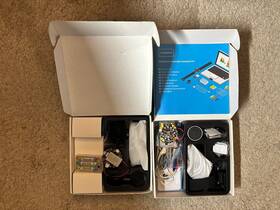
Here are two used Makeblock halo code kits with the items shown in photos. I don't know too much about these but hesitate to ask questions.
part #: p1030065 price
- $19.99
specifications tvboardgo:
- brand: Makeblock
- mpn: P1030065
- part type: Board Kit
- upc: 928819509269
offer tvboardgo:
- started: April 6, 2026
- options: Ship-to-home
- sold: 0
- quantity: 1
- availability: In Stock
- best offers: True
payments tvboardgo:
- credit card: Mastercard
- other
- wallet: Paypal
general tvboardgo:
- condition: Used
- TV, Video Home Audio > TV, Video Audio Parts > TV Boards, Parts Components
shipping tvboardgo:
- class: Standard
- cost: $0.00
- type: Fixed
- service: Standard
- transit: 3-8 Days
seller tvboardgo:
- # reviews: 1268
- city: Prairie Village, Kansas
- rating: 100.0%
returns tvboardgo:
- policy: No Returns