DELL Board Logic U2718Q 4H.3KU01.A00
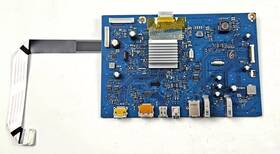
( Brand: Dell ), ( Manufacturer Part Number: KU01A005E3KU01001 ), ( Type: Main Board ), ( Compatible Model: U2718q ), ( Compatible Brand: For Dell ), ( Country Of Origin: United States )
Review DELL Main Board 5e3ku01001 Logic Genuine Oem Tested
The **Dell U2718Q** is a premium ultra-high-definition business monitor designed to elevate productivity, creativity, and visual clarity for professionals in corporate, design, and enterprise environments. Engineered with Dell s signature precision and reliability, this **4K UHD (3840 x 2160) IPS panel** delivers breathtaking resolution and vibrant color accuracy, making it an ideal choice for tasks ranging from data analysis and video conferencing to graphic design and multimedia editing. The monitor features a **4-sided UltraSharp InfinityEdge bezel**, minimizing visual distractions by reducing frame intrusion to just **1.2mm**, creating an immersive viewing experience that maximizes screen real estate. With a **4:3 aspect ratio**, the U2718Q offers a unique balance between productivity and efficiency, allowing users to multitask seamlessly by displaying two documents side-by-side or extending a single application across the entire display.
Powered by Dell s **DisplayHDR 400** technology, this monitor achieves a peak brightness of **350 nits** and a **100% sRGB color gamut**, ensuring consistent color reproduction and reduced eye strain during extended use. The **IPS (In-Plane Switching) panel** delivers **178-degree wide viewing angles**, meaning content remains sharp and true to color whether viewed from the front, side, or slightly above ideal for collaborative workspaces or presentations. For professionals who demand precision, the monitor supports **Dell s Display Manager**, enabling customizable color calibration, factory reset options, and built-in tools for fine-tuning contrast, brightness, and gamma settings to match specific workflow requirements.
Connectivity options are both versatile and future-proof, with **two HDMI 2.0 ports** (supporting up to 4K 60Hz), a **DisplayPort 1.2** (capable of 4K 60Hz or 3840x2160 120Hz for compatible GPUs), and a **USB 3.0 Type-C port** with **USB Power Delivery (PD)**, allowing for seamless charging of compatible devices while extending display output. The **KVM (Keyboard, Video, Mouse) switch** functionality simplifies multi-device management, enabling users to switch between multiple systems with a single keyboard and mouse setup, reducing clutter and streamlining workflows. Additionally, the monitor includes **Dell s Display Command** software, which offers remote control capabilities via USB or network, enabling IT administrators to configure and monitor displays across an enterprise environment efficiently.
Built with durability in mind, the U2718Q features a **thin, sleek aluminum frame** that not only enhances its aesthetic appeal but also provides structural integrity, ensuring stability even in demanding office settings. The **VESA mount compatibility** (with a **100x100mm pattern**) allows for flexible positioning, whether wall-mounted for space-saving efficiency or desk-mounted for ergonomic convenience. The monitor s **ergonomic design** includes **height, tilt, and pivot adjustments**, along with a **paddle wheel for precise vertical positioning**, ensuring optimal viewing angles to reduce neck and eye strain during prolonged use. With a **height adjustment range of 120mm**, users can customize the display to their exact comfort level, promoting better posture and reducing fatigue.
For businesses prioritizing sustainability, the U2718Q incorporates **energy-efficient components**, including **Dell s Eco Mode**, which reduces power consumption when the display is idle. The monitor also adheres to **TCO 6.0 and Energy Star certifications**, aligning with Dell s commitment to environmental responsibility. Whether deployed in a corporate office, a creative studio, or a high-end home workspace, the U2718Q combines **cutting-edge display technology, ergonomic flexibility, and robust connectivity** to deliver a premium visual experience that enhances both efficiency and creativity. Its **rugged yet refined design**, paired with Dell s reputation for reliability, makes it a standout choice for professionals who demand nothing less than excellence in their digital workspace.
### **Pros and Cons of buying a Dell U2718Q Monitor (Model: KU01A005E3KU01001, Logic Board: 4H.3KU01.A00, 5E3KU01001)**
#### **Pros:**1. **High-Resolution Display (3840x2160, 4K UHD)**
- Offers sharp, detailed visuals ideal for graphic design, video editing, and productivity tasks.
- Suitable for high-end gaming and media consumption with minimal pixelation.
2. **Wide Color Gamut (98% DCI-P3, 99% Adobe RGB, 120% sRGB)**
- Excellent color accuracy and vibrancy, making it a strong choice for professionals in creative fields.
- Supports HDR10 for enhanced contrast and brightness in supported content.
3. **IPS Panel Technology**
- Wide viewing angles (178 horizontal/vertical) reduce color shift when viewed from different positions.
- Better color consistency compared to TN panels, improving workflow efficiency.
4. **Thin Bezel Design**
- Minimalist and modern aesthetic, reducing visual obstruction in multi-monitor setups.
- Works well in compact workspaces or when using multiple displays.
5. **USB-C and HDMI Connectivity**
- USB-C with Power Delivery (up to 90W) allows for charging laptops and data transfer in one cable.
- HDMI 2.0 and DisplayPort 1.4 support high-resolution outputs for compatibility with most devices.
6. **Dell s Build Quality and Reliability**
- Known for durable construction with a sturdy stand and minimal flex.
- Dell s customer support and warranty coverage (typically 3 years) provide peace of mind.
7. **Ergonomic Design**
- Adjustable height, tilt, and pivot for comfortable viewing angles.
- VESA mount compatibility (100x100mm) allows for wall or arm mounting.
8. **Low Blue Light and Eye Care Features**
- Flicker-free backlight and adjustable brightness help reduce eye strain during long work sessions.
- Dell s Eye Care technology includes a blue light filter and customizable settings.
9. **Compatibility with Dell s UltraSharp Line**
- Works seamlessly with other Dell UltraSharp monitors for a cohesive multi-display setup.
- Supports Dell s Display Manager software for easy calibration and management.
10. **Good Brightness (350 nits)**
- Bright enough for most indoor use, though not as high as some HDR monitors (which may require ambient light adjustments).
---
#### **Cons:**1. **High Price Point**
- The U2718Q is premium-priced, making it less accessible for budget-conscious buyers.
- May not offer significant advantages over lower-cost 4K monitors (e.g., LG UltraFine, ASUS ProArt) for casual users.
2. **Limited HDR Performance**
- While it supports HDR10, the peak brightness (350 nits) is lower than true HDR monitors (e.g., 600 nits).
- HDR content may not look as impactful as on dedicated HDR displays.
3. **No USB Hub or Additional Ports**
- Unlike some Dell UltraSharp models, this monitor lacks a built-in USB hub, requiring additional adapters for extra ports.
- Limited to two video inputs (HDMI DisplayPort) and one USB-C, which may be restrictive for some setups.
4. **Potential for Overkill for Casual Use**
- If you primarily use the monitor for web browsing, office work, or light media, the extra features (e.g., color accuracy) may not be necessary.
- Non-professionals may find the cost unjustified compared to more affordable 4K alternatives.
5. **Dell s Software Dependence**
- Some advanced features (e.g., color calibration, display management) rely on Dell s proprietary software, which may not be as polished as third-party alternatives.
- Requires a PC running Windows for full functionality (macOS support is limited).
6. **Weight and Bulkiness**
- At 5.5 lbs (2.5 kg), it s heavier than some ultra-thin monitors, which may be cumbersome for travel or small desks.
- The stand is sturdy but not as compact as some competitors.
7. **Potential for Driver Issues**
- Like many Dell monitors, it may require occasional driver updates to maintain optimal performance.
- Some users report minor compatibility quirks with certain GPUs or operating systems.
8. **No Built-in Speaker or Microphone**
- Unlike some business monitors, it lacks audio features, requiring external speakers or headsets.
9. **Reflective Surface**
- The IPS panel can be prone to glare in brightly lit rooms, though this is common across most IPS monitors.
- Anti-glare coatings are not standard, adding to the cost if desired.
10. **Resale Value Depreciation**
- Like most electronics, monitors lose value quickly. If you plan to upgrade soon, the long-term ROI may be low.
---
### **Conclusion:**The **Dell U2718Q** is an excellent choice for **professionals in creative fields (graphic design, video editing, photography), power users, and those who prioritize color accuracy, build quality, and ergonomics**. Its 4K resolution, wide color gamut, and Dell s reliability make it a strong investment for productivity and media work. However, for **casual users, gamers, or budget-conscious buyers**, the higher cost and lack of standout features (like HDR brightness or USB hubs) may make it less appealing compared to alternatives like the **LG UltraFine 4K, ASUS ProArt PA279CV, or BenQ PD3220U**.
If you need a **versatile, high-end monitor** that integrates well with Dell s ecosystem and demands premium performance, the U2718Q is a solid pick. Otherwise, consider whether a slightly less expensive or feature-rich alternative better suits your needs.
---
### **Recommendation:** - **Buy the Dell U2718Q if:**- You work in **graphic design, video editing, or color-critical tasks** and need accurate color reproduction.
- You value **Dell s build quality, ergonomics, and warranty support**.
- You frequently use **USB-C for charging and data transfer** and need a reliable 4K display.
- You re part of a **multi-monitor Dell UltraSharp setup** and want consistency.
- **Consider alternatives if:**- You re on a **tight budget** and can compromise on color accuracy or brightness.
- You prioritize **HDR performance** and want a monitor with higher peak brightness (e.g., **LG UltraFine 4K Pro HDR**).
- You need **more ports** (e.g., USB hub, additional HDMI/DisplayPort) and prefer a monitor like the **ASUS ProArt PA279CV**.
- You re a **gamer** and would benefit from a monitor with **higher refresh rates or lower input lag** (e.g., **ASUS ROG Swift PG279QM**).
For most **professionals and power users**, the U2718Q remains a **top-tier choice**, but weigh its pros and cons carefully against your specific needs.
Details:
Because of this, the board saw very little actual use. Typical functions of this board include video signal processing, input switching, and communication with the panel controller power inside monitor. The board was removed from a fully functional fairly new Dell U2718Q.The original monitor had physically broken LCD panel shortly after purchase, but the internal electronics were working properly at time of removal. The board has been safely stored and is in excellent working condition.
Condition is used and fully functional. The board may show minor cosmetic signs from normal handling or removal the monitor, which is typical for internal electronic components. This listing includes the main board only. It is a genuine OEM Dell component and ideal for repairing U2718Q monitor with failed or damaged main board.
Quantity available: 2 identical boards. Please verify that the board number matches your existing before purchasing, as compatibility with other model's cannot be guaranteed. This listing is for a genuine Dell U2718Q main logic board with number 4H.3KU01.A00 and part 5E3KU01001.
part #: ku01a005e3ku01001 prices
- $20.00-$155.99
specifications tvboardgo:
- brand: Dell
- mpn: Ku01a005e3ku01001
- type: Main Board
- compatible model: U2718q
- compatible brand: For Dell
- country of origin: United States
general tvboardgo:
- condition: For parts or not working
- TV, Video Home Audio > TV, Video Audio Parts > TV Boards, Parts Components
seller tvboardgo:
- # reviews: 439
- rating: 100.0%
- city: Fairfax, Virginia
returns tvboardgo:
- policy: No Returns
payments tvboardgo:
- credit card: Mastercard
- wallet: Google-pay
- other
offer tvboardgo:
- availability: In Stock
- sold: 0
- started: March 9, 2026
- options: Ship-to-home
- quantity: 1
shipping tvboardgo:
- type: Calculated
- cost: $8.46
- transit: 4-10 Days
- carrier: USPS
- service: USPS Ground Advantage
- class: Standard
Dell KU01A005E3KU01001 Is Similar To:
- 00.80w01.001 Dell Mp2300 Projector Main (20.3% similar) Used but fully functional. Pulled from a working unit with broken lens...(March 29th, 2017)
- 01004-3190 Dell Main Video Board Motherboard Unit (29% similar) There are possibly several different boards for each model TV. Dell 37 W3706MC main video board motherboard unit free USPS priority mail shipping pulled from a working with small crack on the screen. Tested and working. Do not match by TV model...(April 30th, 2018)
- 48.7t001.011 Dell Genuine P2212 Driver (23.6% similar) Please ship actual item that we to you in return...(November 29th, 2017)
- 5e0wa02001 Dell Power Supply Board And (25.2% similar) See photos above. See photos above. Please double check the pictures before purchasing and ask questions prior. What you see is get, may have cosmetic marks and signs of use throughout. Receive only what is pictured listed. Fast shipping. See condition above for more details. No other accessories ...(July 26th, 2018)
- 5e39t01001 Dell U3417w Main Board (36.1% similar) You can't go only by the model number of your TV or. Tested works pulled from new cracked screen monitor...(January 2nd, 2018)
- 65.7f9z1.001 Dell Genuine U3011t 30 Monitor (25.8% similar) 7F901 EPA 39...(March 12th, 2017)
- A80kgcdlp Dell Main Board With Cable (30.4% similar) Dell A80KGCDLP 715G2089-1 main board with cable pulled from a working but cracked monitor. The cable magnet ring is broken but has carefully been taped to give same shielding result...(September 15th, 2018)
- Lj92-00981a Dell W4200hd Y-main Sustain (23.4% similar) Item may have some scuffs, scrapes, scratches and smudges or be a little dirty...(October 2nd, 2017)
- Ps-2201-3-hf Dell Genuine Power Board For (24.6% similar) ...(February 10th, 2017)
- Se2717h Dell Lcd Monitor Oem Factory Free Shipping (24.5% similar) Dell SE2717H 27 LCD monitor base stand mount w neck, oem factory...(June 1st, 2018)
- Slm-240d7 Dell Monitor Inverter Board Rev (23.1% similar) Pulled from a working unit with bad LCD...(October 24th, 2018)