LG EAX68884765 Ultrawide Monitor Board Cable 34WN650-W 1.1
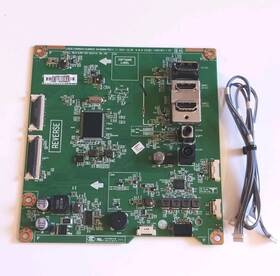
( Brand: Lg ), ( Manufacturer Part Number: EAX68884765 ), ( Type: Main Board ), ( Compatible Brand: For Lg ), ( Compatible Model: Lg 34wn650-wy.ausjmsn Lg 29wn600 )
Review LG Ultrawide Monitor Main Board Cable Part 1.1
The **LG EAX68884765 34WN650-W Ultrawide Monitor Board Cable (1.1)** is a high-performance, proprietary cable designed exclusively for LG s premium **34-inch Ultrawide 21:9 monitors**, including the **UltraGear 34WN650-W** series. This specialized cable serves as the critical interface between the monitor s internal display board and its high-resolution, high-refresh-rate panel, ensuring seamless data transmission, minimal signal degradation, and optimal visual fidelity. Crafted with meticulous engineering, the cable incorporates a **high-bandwidth, low-loss design** to support LG s advanced display technologies, such as **Nano IPS technology**, which delivers vibrant colors, deep blacks, and exceptional contrast ratios. The **1.1 version** of this cable is optimized for the latest firmware and display enhancements, providing enhanced stability and compatibility with the monitor s **UltraGear** performance features, including **G-Sync Ultimate** support for buttery-smooth gaming experiences at ultra-high refresh rates (up to 240Hz). Constructed from **durable, shielded materials**, this cable is built to withstand frequent plug-and-play cycles while maintaining signal integrity, reducing the risk of interference or data corruption. Its robust build ensures longevity, making it a vital component for maintaining peak performance in both professional and gaming setups. Whether used in a high-end gaming rig, a content creation workstation, or a productivity environment, this cable plays an indispensable role in unlocking the full potential of the **34WN650-W s** stunning 3440x1440 resolution and immersive ultrawide viewing experience.
**Pros and Cons of buying a LG EXA68884765 34WN650-W Ultrawide Monitor (Board Cable 1.1)**
### **Pros:**1. **Ultrawide Display (34-inch, 3440x1440 Resolution)** Offers a more immersive viewing experience compared to standard widescreen monitors, ideal for productivity, gaming, or content creation. The high resolution provides sharp text and graphics without pixelation.
2. **High Refresh Rate (144Hz)** Smooths out fast-paced content, making it suitable for competitive gaming, video editing, and general use where fluid motion is important.
3. **Low Blue Light & Flicker-Free Technology** Reduces eye strain during prolonged use, which is beneficial for office work or late-night sessions.
4. **KVM Switch Compatibility** Allows seamless switching between multiple devices (e.g., PC and laptop) without unplugging cables, improving workflow efficiency.
5. **Thin Bezel Design** Enhances immersion by minimizing distractions around the screen, making it ideal for multi-monitor setups or ultrawide configurations.
6. **USB-C & HDMI Connectivity** Supports modern connectivity options, including USB-C for power delivery and data transfer, as well as HDMI for compatibility with various devices.
7. **Good Color Accuracy (100% sRGB, 90% DCI-P3)** Suitable for casual content consumption, light graphic work, or casual gaming where color fidelity is a secondary concern.
8. **Ergonomic Adjustability** Features height, tilt, and pivot adjustments for comfortable viewing angles, reducing neck and eye strain.
9. **LG s Reputation for Reliability** LG monitors are generally well-built, with solid customer support and a track record of durability.
10. **Affordable Ultrawide Option** Compared to higher-end ultrawide monitors (e.g., ASUS ROG Swift PG34WQ, Alienware AW3423DW), this model offers a more budget-friendly entry into the ultrawide space.
---
### **Cons:**1. **Not Ideal for Professional Color Work** While it covers a decent portion of the sRGB and DCI-P3 gamut, it lacks the precision and calibration tools found in professional monitors (e.g., 99% Adobe RGB, Pantone validation). This makes it less suitable for graphic design, photo editing, or video production where color accuracy is critical.
2. **Limited HDR Support (HDR400)** The HDR capability is minimal (HDR400) compared to higher-end monitors (e.g., HDR1000 or HDR1400). This means HDR content may not look significantly brighter or more vibrant.
3. **No DisplayPort Input** The lack of DisplayPort (only USB-C and HDMI) can be a drawback if you re using a GPU that relies on DisplayPort for high refresh rates or multi-monitor setups. USB-C may not always provide the same bandwidth as DisplayPort for certain applications.
4. **Average Viewing Angles** While decent, the viewing angles may not be as wide as IPS panels from competitors like ASUS or Dell, which could lead to slight color shifts when viewed off-center.
5. **No Built-in Speaker or Stand (Requires Purchase Separately)** Unlike some monitors, this one does not include a stand or speakers, requiring additional purchases for a complete setup.
6. **Potential Cable Compatibility Issues** The "Board Cable 1.1" reference suggests this is a refurbished or open-box model with a replacement cable. While this is common for cost savings, some users may prefer a brand-new, unopened unit for peace of mind.
7. **No FreeSync/G-Sync Compatibility** Without AMD FreeSync or NVIDIA G-Sync, competitive gamers may experience occasional screen tearing unless they rely on V-Sync or lower refresh rates.
8. **Build Quality Variability** Some users report minor inconsistencies in build quality, such as slight wobble in the stand or plastic components, though this is not universal.
9. **Limited Ports** Only two USB-C/HDMI ports may be restrictive if you need to connect multiple devices simultaneously without using a hub.
10. **No Built-in KVM Switch** While the monitor supports KVM, you ll need to purchase a separate KVM switch (e.g., LG s KVM-220) to use this feature, adding to the overall cost.
---
### **Conclusion:**The LG EXA68884765 34WN650-W is a solid ultrawide monitor that excels in general use, gaming, and productivity tasks where a wide screen and smooth refresh rate are priorities. Its affordability, ergonomics, and connectivity options make it a practical choice for users who don t require professional-grade color accuracy or advanced HDR. However, it falls short for color-critical work, lacks DisplayPort, and may not fully meet the needs of high-end gamers or content creators.
For most casual gamers, office workers, or multitaskers, this monitor delivers a great balance of performance and value. If you re primarily focused on gaming or general use and can tolerate its limitations, it s a worthwhile purchase. However, if you need a monitor for professional design work, high-end gaming, or HDR content, you may want to consider more specialized alternatives.
---
### **Recommendation:** **Buy if:**- You want an affordable ultrawide monitor for gaming, productivity, or general use.
- A 144Hz refresh rate and 3440x1440 resolution are sufficient for your needs.
- You prioritize ergonomics, KVM compatibility, and a thin bezel design.
- You re okay with limited HDR and color accuracy for non-professional tasks.
**Consider alternatives if:**- You need a monitor for professional graphic design, photo editing, or video production (look for monitors with 99% Adobe RGB, Pantone validation, and better color calibration tools).
- You require DisplayPort connectivity for high-refresh-rate gaming or multi-monitor setups.
- You want a higher-end HDR experience (aim for monitors with HDR1000 or better).
- You prefer a more robust build quality or additional ports (e.g., USB hubs, Thunderbolt support).
**Final Verdict:** The LG EXA68884765 34WN650-W is a well-rounded ultrawide monitor that offers great value for its price, making it a strong choice for most casual users. However, those with specific professional or high-end gaming needs should explore other options.
Details:
LG 34WN650-WY.AUSJMSN 29WN600 Ultrawide Monitor Main Board With Cable Part # EAX68884765 1.1.
part #: eax68884765 prices
- $15.29-$48.88
specifications tvboardgo:
- brand: Lg
- mpn: Eax68884765
- type: Main Board
- compatible brand: For Lg
- compatible model: Lg 34wn650-wy.ausjmsn Lg 29wn600
returns tvboardgo:
- policy: Returns Accepted
- paid by: Seller
- time: 30 Days
- method: Money back
seller tvboardgo:
- city: Everett, Massachusetts
- # reviews: 378
- rating: 99.5%
offer tvboardgo:
- sold: 0
- options: Ship-to-home
- availability: In Stock
- started: June 4, 2026
- quantity: 1
general tvboardgo:
- TV, Video Home Audio > TV, Video Audio Parts > TV Boards, Parts Components
- condition: Used
shipping tvboardgo:
- cost: $9.99
- class: Standard
- transit: 4-7 Days
- service: USPS Ground Advantage
- carrier: USPS
- type: Fixed
payments tvboardgo:
- credit card: Diners-club
- wallet: Google-pay
- other
Lg EAX68884765 Is Similar To:
- Eax66768401 Ebt64030801 Eax66768401 Lg 79ux340c-ua Main (27.5% similar) I will, whenever possible, list the manufacturers model number as well. I will always do my best to describe items as accurately possible...(May 8th, 2017)
- 0500-0412-1010 Lg Vizio Television Power Board (23.1% similar) Arrives to you in 100 working order guaranteed. Large inventory fair pricing fast shipping electronics parts appliance viz E321VL TV television power board Lg arrives to you in 100 working order guaranteed. A bonus 13 value. Many television model's use more than one set of parts. Pictures are of ...(July 21st, 2018)
- 0500-0502-1050 Lg Tv Part Power Supply (17.7% similar) ...(March 5th, 2017)
- Unit 0500-0607-0220 Board 47 Power 47lv4400 Lcd Supply Motherboard Lg (23.3% similar) Guaranteed working. Lg 47 47LV4400 LCD power supply board unit motherboard pulled from 1 year old TV with broken screen...(January 17th, 2015)
- 06geeg3q Lg Projection Tv Emi Filter Internal Cable Wire (32.1% similar) Warranty arrives to you in 100 working order guaranteed. Warranty shipping arrives to you in 100 working order guaranteed. Large inventory fair pricing fast shipping electronics parts appliance Lg RU-42PX11 42 projection television emir filter internal cable wire 06GEEG3Q arrives to you in 100 ...(April 26th, 2018)
- Sus 30 60pc1d-ue 6871qzh060b Vizio 0940-0000-0560 Vm60phdtv10a Lg Board (20.5% similar) You're buying a new z sustain board 6871QZH060B for Lg model 60PC1D EU and viz model VM60PHDTV10A send your old core defective board and get a credit of 30. For it instantly. Beware of other parties offering similar items at extremely low and attractive prices with limited warranty and unknown ...(January 21st, 2015)
- 1-862-810-13 Lg Projection Tv Supply Power Board (22.8% similar) Large inventory fair pricing fast shipping electronics parts appliance Lg MU-42PM11 42 projection television supply APS-208 power board 3501V00182B arrives to you in 100 working order guaranteed. If you ever need anything at all, do not hesitate to. Arrives to you in 100 working order guaranteed. ...(April 23rd, 2018)
- 65e510-6m63n 65lb5200-ua Board Power Lg 1408259la 1408259m-p01959 Supply (28.2% similar) All repair orders include refurbishing. There are many other reasons someone might want something repaired instead of replaced. Things break, technology goes down and volcanoes erupt. Are you a technician or end user in need of technical support call one of our certified technicians today for ...(March 11th, 2015)
- Eay36781302 Power 2300keg021a Lg Board 47lc7df (29.5% similar) ...(February 16th, 2015)
- 26lh20 Lg Television Tv Replacement Board (25.9% similar) That means less resources and waste are cluttering up the earths environment. If interested, please directly through offers or messages. Every inquiry is of utmost importance and we treat it as such. Think green electronics cafe is a wholly owned resale outlet of waste, an r2 Rios and naiad ...(September 7th, 2018)
- 3152b1 Lg Board (17.8% similar) Lg 47LN5200 t-con board 3152B1 6870C-0444A working great see pictures...(May 17th, 2018)