SAMSUNG Odyssey Board BN41-02807C LC34G55TWWNXZA
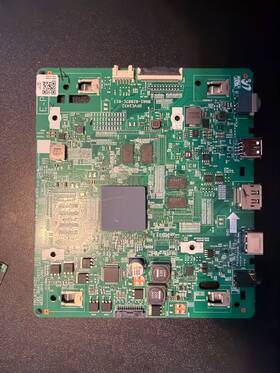
( Brand: Samsung ), ( Manufacturer Part Number: BN4102807C ), ( Type: Main Board ), ( Compatible Brand: For Samsung )
Review SAMSUNG Odyssey G5 C34g55twwn Main Board
The **Samsung Odyssey G5 (BN4102807C, Model LC34G55TWWNXZA)** is a premium gaming monitor that redefines immersive visual experiences with its cutting-edge technology and meticulously crafted design. Engineered for both competitive gamers and content creators, this 34-inch ultrawide display delivers an expansive **3440x1440 (5:2.3) resolution**, offering a stunning 21:9 aspect ratio that maximizes screen real estate for multitasking, gaming, or productivity. The **Quantum HDR 400** technology enhances color accuracy and contrast, producing vibrant, lifelike visuals with a peak brightness of 400 nits, ensuring deep blacks and vivid hues that bring games and media to life with unprecedented clarity. Powered by **AMD FreeSync Premium Pro**, this monitor eliminates screen tearing and stuttering, providing a seamless 120Hz refresh rate for ultra-smooth gameplay, while also supporting **NVIDIA G-Sync** for compatibility with GeForce GPUs. The **Ultra Viewing Angle** technology ensures consistent color reproduction and sharpness from virtually any angle, making it ideal for shared workspaces or collaborative environments.
The **Odyssey G5** features Samsung s **Display Guard Shield**, a durable tempered glass surface that protects against smudges, fingerprints, and minor scratches while maintaining a sleek, modern aesthetic. The monitor s **KVM switch** simplifies setup by allowing seamless switching between multiple devices without the need for additional peripherals, streamlining workflows for gamers and professionals alike. With **Dual HDMI 2.0 and DisplayPort 1.4** inputs, it supports high-bandwidth connections for 4K content and next-gen gaming, while the **USB Type-C** port enables versatile connectivity for charging and data transfer. The **height-adjustable stand** with **tilt and pivot functions** ensures ergonomic flexibility, allowing users to customize the viewing angle for optimal comfort during extended sessions.
Beyond its technical prowess, the **Odyssey G5** boasts a minimalist yet robust design, with a slim bezel and a matte finish that reduces glare while maintaining a premium look. The **RGB backlighting** on the stand adds a touch of customization, letting users match the monitor s aesthetic to their setup. Whether immersed in a fast-paced esports title like *Valorant* or *Fortnite*, editing high-resolution footage in *Premiere Pro*, or enjoying cinematic content in 4K, this monitor delivers an unparalleled blend of performance, precision, and visual fidelity. Built for those who demand the best, the **Samsung Odyssey G5** is more than just a display it s a gateway to a more engaging, efficient, and immersive digital experience.
### **Pros and Cons of the Samsung Odyssey G5 (BN4102807C / LC34G55TWWNXZA)**
#### **Pros**
1. **High Refresh Rate and Low Input Lag**
The G5 features a **240Hz refresh rate** with **1ms response time (GTG)**, making it ideal for competitive gaming where fast reaction times are critical. This reduces motion blur and ensures smoother gameplay in fast-paced titles like *Fortnite*, *Valorant*, or *CS2*.
2. **Curved 1000R Design for Immersive Viewing**
The **34-inch curved display** enhances immersion by expanding the field of view, which is beneficial for gaming, movies, and productivity tasks that require a wider workspace. The curvature reduces eye strain compared to flat screens when viewed from the center.
3. **High Brightness and Color Accuracy**
With a **peak brightness of 400 nits** and **100% DCI-P3 color coverage**, the panel delivers vibrant colors and good contrast for gaming and media consumption. While not as bright as high-end gaming monitors (e.g., 600 nits), it performs well in moderately lit rooms.
4. **USB-C and HDMI Connectivity**
The monitor includes **one USB-C port (with power delivery)** and **two HDMI 2.0 ports**, providing flexibility for connecting laptops, consoles, and gaming PCs. The USB-C port supports **fast charging** for compatible devices, adding convenience.
5. **KVM Switch Support**
The built-in **KVM (Keyboard, Video, Mouse) switch** allows seamless switching between two PCs without unplugging peripherals, which is useful for multitasking or testing setups.
6. **Good Ergonomics**
The monitor features **height, tilt, and pivot adjustments**, allowing for comfortable viewing angles. The **VESA mount compatibility (100x100mm)** also enables wall-mounting for space-saving setups.
7. **Affordable for a High-Refresh-Rate Gaming Monitor**
Compared to other 240Hz gaming monitors (e.g., ASUS ROG Swift PG279QM, Gigabyte M27Q), the G5 offers strong performance at a **lower price point**, making it a budget-friendly option for competitive gamers.
8. **Samsung s Display Quality**
Samsung s **VA panel** provides **high contrast ratios (3000:1)** and **good black levels**, which enhances the depth of colors in games and movies. The panel also supports **FreeSync Premium (G-Sync compatible)**, reducing screen tearing and stuttering in compatible games.
---
#### **Cons**
1. **VA Panel Limitations (Ghosting and Viewing Angles)**
The **VA (Vertical Alignment) panel** is prone to **ghosting** in fast-moving scenes, which can be noticeable in competitive shooters or sports games. While the **1ms response time** helps, some users may still experience lingering afterimages.
Additionally, color accuracy and contrast **degrade significantly when viewed from extreme angles**, making it less ideal for multi-monitor setups where off-center viewing is common.
2. **Lower Peak Brightness Than Competitors**
At **400 nits**, the G5 is **not as bright as IPS-based gaming monitors** (e.g., LG 27GP850-B, which reaches 400 nits but with better uniformity). This can make colors appear slightly washed out in very bright rooms, though it remains adequate for most gaming environments.
3. **No Built-in Speakers or Headphone Jack**
Unlike some gaming monitors (e.g., AOC C24G1), the G5 lacks **built-in speakers or a 3.5mm audio jack**, requiring external audio solutions for gaming.
4. **Limited Port Selection**
While the **USB-C and HDMI ports are convenient**, the lack of **DisplayPort** (which supports higher resolutions and refresh rates) is a drawback for users with high-end GPUs. The monitor maxes out at **3440x1440 240Hz over USB-C** and **3440x1440 144Hz over HDMI**, which may limit future-proofing for some users.
5. **No FreeSync Premium Pro or G-Sync Ultimate**
The monitor supports **FreeSync Premium**, but not the **higher-tier FreeSync Premium Pro** (which includes 1000R curvature and better color accuracy). Similarly, while it s **G-Sync compatible**, it doesn t meet NVIDIA s **G-Sync Ultimate** standards, which include features like **144Hz refresh rates and 10-bit color**.
6. **Slightly Thicker Bezel**
The **34-inch curved design** results in **thicker bezels** compared to ultra-thin gaming monitors, which may reduce the immersive feel in multi-monitor setups.
7. **No Built-in Adjustable Stand**
While the stand is **adjustable in height and tilt**, it is **not as premium as some competitors** (e.g., ASUS ROG Strix monitors with more refined designs). Some users may prefer a more robust or ergonomic stand.
---
### **Conclusion**
The **Samsung Odyssey G5 (LC34G55TWWNXZA)** is a **strong mid-range gaming monitor** that excels in **competitive gaming** due to its **240Hz refresh rate, low input lag, and curved design**. It offers **good value for money**, especially for players who prioritize **fast response times and immersion** over absolute color accuracy or brightness.
However, **ghosting, limited port selection, and lower peak brightness** compared to IPS alternatives may be drawbacks for some users. It is **best suited for**:
- **Competitive gamers** (FPS, MOBAs, esports titles).
- **Budget-conscious buyers** who want a high-refresh-rate monitor without overspending.
- **Users who prefer VA panels** for better contrast and don t mind slight color shifts at angles.
If **color accuracy, brightness, or future-proofing** (e.g., DisplayPort) are priorities, alternatives like the **LG 27GP850-B (IPS, 240Hz, DP)** or **Gigabyte M27Q (IPS, 240Hz, DP)** may be worth considering. For **ultra-wide or productivity use**, a **21:9 monitor** (e.g., ASUS ROG Swift PG34WQX) might be a better fit.
### **Final Recommendation**
**Buy the Samsung Odyssey G5 if:**You play **competitive shooters or fast-paced games** and need **240Hz 1ms response time**.
You want a **curved, immersive display** without breaking the bank.
You prioritize **contrast and black levels** over peak brightness.
You need **USB-C connectivity** for laptop setups.
**Avoid the Samsung Odyssey G5 if:**You require **high brightness or IPS-level color accuracy** for media consumption.
You plan to use **DisplayPort** for future upgrades (e.g., higher resolutions).
You dislike **VA panel ghosting** or need **wide viewing angles**.
You want a **multi-monitor setup** where off-center viewing is frequent.
**Alternative Considerations:**- **For better color/brightness:** LG 27GP850-B (IPS, 240Hz, DP).
- **For ultra-wide gaming:** ASUS ROG Swift PG34WQX (21:9, 144Hz, DP).
- **For budget 1440p:** Gigabyte M27Q (IPS, 240Hz, DP).
Details:
Includes: Main board only. Pulled from Samsung Odyssey G5 C34G55TWWN ultra wide monitor with damaged panel during part-out. Removed from functioning monitor prior to disassembly. Details: Brand: Samsung, model: C34G55TWWN / LC34G55TWWNXZA, Board Number: BN41-02807C, Genuine OEM part.
Please verify compatibility before purchase. Samsung Odyssey G5 34 Monitor Main Board OEM.
part #: bn4102807c prices
- $40.00-$284.99
specifications tvboardgo:
- brand: Samsung
- mpn: Bn4102807c
- type: Main Board
- compatible brand: For Samsung
seller tvboardgo:
- # reviews: 3
- rating: 100.0%
- city: Helena, Montana
offer tvboardgo:
- availability: In Stock
- best offers: True
- started: February 4, 2026
- quantity: 1
- sold: 0
- options: Ship-to-home
payments tvboardgo:
- credit card: Discover
- wallet: Google-pay
- other
shipping tvboardgo:
- service: USPS Ground Advantage
- type: Calculated
- transit: 3-8 Days
- class: Standard
- cost: $6.51
- carrier: USPS
returns tvboardgo:
- policy: No Returns
general tvboardgo:
- condition: Used
- TV, Video Home Audio > TV, Video Audio Parts > TV Boards, Parts Components
Samsung BN4102807C Is Similar To:
- 0-tr.bb.025-a Bestparts Samsung Power Supply Board For (25.8% similar) ...(August 7th, 2018)
- 0-tr.bb.034-a Bestparts Us Bhs Samsung Power Supply Board (23.7% similar) BN44-00424A PD55A1 VHS Samsung power supply board UN55D6000SF UN55D6050TFNOTE:1...(August 7th, 2018)
- 0736211948281 Samsung Television Tv Replacement Power Supply Board (26.4% similar) ...(September 8th, 2018)
- 0818970011052 Samsung Television Tv Replacement Power Video Board Led (28.6% similar) All internal electronics still work fine. Last month, our toddler threw a hard object at the TV and damaged interior screen. This 55 flat-screen TV is still like-new, but damaged. Local pick-up is required. We just don't have time to repair it ourselves...(December 24th, 2018)
- 19.54t01.013 Samsung Inverter Board Lower (33.6% similar) In working condition. 013 condition: the parts were removed from TV with cracked screen. It doesn't take you longer than 1 minute, but that one minute can determine our process of work. They have been tested and are in working order. We check our messages often and respond to all inquiries. Removed ...(June 4th, 2018)
- 1p-280135a Samsung Power Supply Working Board (30.9% similar) Board for Samsung TV be sure it is the one you are in search of. Model number can be found in pics...(June 17th, 2018)
- 27-d014913 Samsung Inverter Board Cmo (31.3% similar) Fully functional inverter board taken from a working set with cosmetically damaged display part is tested and works excellent guaranteed...(April 9th, 2018)
- 31t09-com T315hwo4 Vb Auo Samsung Board (22.2% similar) ...(May 26th, 2018)
- 3200210347060ae Samsung Main Board For Smart Tv (33.6% similar) Once you opened the item its yours. Item was pulled from a TV with cracked screen and working at time of testing. Used main board for a Samsung model UN32J4002AF 32 TV. I am quite understanding and know things can happen...(October 17th, 2018)
- 320aa05c2lv0.0 Lj94-02302c Samsung T-con Board (25.8% similar) For sale: t-con board 320AA05C2LV0. With cables for Samsung TV LN32A450C1D...(October 1st, 2017)
- 35-d021631-l Samsung Bn81-01870a T-con Board (34.4% similar) ...(May 17th, 2017)