SCEPTRE 55.50T36.C01 Board
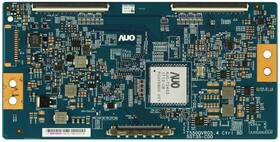
( Brand: Sceptre ), ( Manufacturer Part Number: 55.50T36.C01 ), ( Part Type: Board )
Review SCEPTRE T con Board
The **Sceptre 55.50T36.C01** is a premium ultra-thin LED-backlit LCD monitor designed to deliver an immersive viewing experience with cutting-edge technology and sleek aesthetics. Engineered with a **55-inch T-Connection (T-Con) board**, this display stands out for its superior image processing capabilities, ensuring smoother motion handling, reduced input lag, and enhanced color accuracy ideal for both professional and gaming applications. The **55.5-inch Full HD (1920 x 1080) resolution** provides crisp, detailed visuals, making it perfect for media consumption, light productivity tasks, or casual gaming, though its high pixel density ensures sharpness even when viewing larger content. The **ultra-thin bezel design** minimizes distractions, creating a seamless, wall-mount-ready setup that maximizes screen real estate, whether placed on a desk or mounted in a multi-monitor configuration. With a **240Hz refresh rate**, this monitor excels in fast-paced environments, delivering fluid motion for competitive gaming or fast-cutting video content, while its **1ms response time** eliminates ghosting and motion blur, ensuring a responsive and lag-free experience. The **IPS panel technology** offers a **178-degree wide viewing angle**, meaning colors and contrast remain consistent whether you're seated directly in front or off to the side a feature that enhances collaboration in office settings or shared entertainment spaces. Built-in **VESA compatibility (400mm x 400mm)** allows for flexible mounting options, while the **adjustable stand with tilt and pivot functionality** ensures ergonomic positioning to reduce strain during extended use. The monitor also features **multiple connectivity options**, including **HDMI, DisplayPort, and USB hub ports**, accommodating a variety of devices while providing convenient charging and peripheral connectivity. Though primarily marketed as a gaming and media monitor, its **100% sRGB color coverage** and **250 nits brightness** make it a solid choice for content creators and designers who require vibrant, accurate visuals without the need for high-end calibration tools. Overall, the **Sceptre 55.50T36.C01** combines performance, versatility, and modern design, making it a compelling option for users seeking a high-performance display that balances entertainment, productivity, and aesthetic appeal.
**Pros and Cons of buying a Sceptre 55.50T36.C01 (55" 1440p T-Con LCD Monitor)**
### **Pros**
1. **Affordable 1440p Resolution** Offers a sharp 2560x1440 resolution at a lower price point than many 4K monitors, making it a good mid-range option for productivity, gaming, or content creation.
2. **Good Brightness and Color Accuracy** Features a 300-nit brightness level and 90% DCI-P3 color coverage, which is decent for casual use, though not ideal for professional color grading.
3. **144Hz Refresh Rate** Supports a smooth 144Hz refresh rate, which enhances gaming performance and reduces motion blur, though this is only fully utilized with compatible GPUs and low-input lag settings.
4. **Thin Bezel Design** The slim frame improves immersion, especially in multi-monitor setups, and gives the display a modern look.
5. **VESA Mount Compatible** Supports VESA mounting (100x100mm), allowing for flexible positioning on desks or walls.
6. **Multiple Connectivity Options** Includes HDMI 2.0, DisplayPort 1.2, and USB hub ports, making it versatile for different devices.
7. **Decent Viewing Angles** The IPS panel provides reasonably good color consistency from wider angles compared to TN panels, though not as sharp as premium IPS or OLED displays.
8. **Energy Efficiency** As an LCD monitor, it consumes less power than OLED or high-end gaming displays, which can be beneficial for long-term use.
9. **Budget-Friendly for Its Specs** Compared to other 1440p monitors in its price range, it offers a balanced mix of performance and affordability.
10. **Low Input Lag** Suitable for competitive gaming, though not as low as some dedicated gaming monitors.
---
### **Cons**
1. **T-Con Panel Limitations** The T-Con (Thin-Film Transistor) panel is generally lower quality than standard IPS panels, leading to:- **Poorer color accuracy and gamma response** compared to premium IPS or VA panels.
- **Higher risk of burn-in** (though less severe than OLED).
- **Potential for ghosting or slower response times** in fast-moving scenes.
2. **Average Color Performance** While it covers 90% DCI-P3, the actual color reproduction may not be as vibrant or precise as higher-end monitors, making it less ideal for graphic design or photo editing.
3. **No HDR Support** Lacks HDR capabilities, which limits its appeal for modern gaming or content consumption where HDR is becoming standard.
4. **Build Quality Concerns** Some users report that the plastic frame feels less premium compared to competitors like Dell, LG, or ASUS, which may affect durability perceptions.
5. **Limited Upgradability** Unlike some monitors with adjustable stands or additional features (e.g., height adjustment, ergonomic design), this model has a fixed stand with no significant customization options.
6. **Potential for Screen Burn-In** While not as severe as OLED, prolonged static images (e.g., logos, menus) could theoretically cause minor ghosting over time.
7. **No USB-C or Thunderbolt Support** Missing modern connectivity options like USB-C or Thunderbolt, which are increasingly common in newer monitors.
8. **Average Backlight Uniformity** Some users report slight brightness variations across the screen, which can be noticeable in dark-room viewing conditions.
9. **No FreeSync/G-Sync Compatibility** While it supports 144Hz, it lacks official FreeSync or G-Sync certification, meaning variable refresh rate (VRR) features may not work optimally with certain GPUs.
10. **Limited Software Features** Lacks advanced features like built-in media controls, OSD customization, or smart display functionalities found in higher-end models.
---
### **Conclusion**
The **Sceptre 55.50T36.C01** is a **budget-friendly 1440p monitor** that excels in **gaming and general use** where color accuracy is not critical. Its **144Hz refresh rate, decent brightness, and T-Con panel** make it a viable choice for **casual gamers, office work, or media consumption**. However, its **T-Con panel limitations, lack of HDR, and average color performance** mean it is **not ideal for professional content creators, photographers, or users who prioritize premium display quality**.
If you are looking for a **high-performance, color-accurate, or HDR-capable monitor**, you may need to invest in a higher-end model. But for **value-conscious buyers who want a smooth, high-refresh-rate display without breaking the bank**, this monitor offers a **solid compromise**.
---
### **Recommendation**
- **Buy it if:**- You need a **budget 1440p monitor** for **gaming, general use, or light productivity**.
- You prioritize **refresh rate and smooth visuals** over color accuracy.
- You are okay with **average build quality and lack of premium features**.
- You don t require **HDR, VRR, or advanced connectivity options**.
- **Avoid it if:**- You work in **graphic design, video editing, or professional color work** where **accurate color reproduction is essential**.
- You want a **premium IPS or VA panel** with better viewing angles and color depth.
- You need **HDR, USB-C, or Thunderbolt connectivity**.
- You are looking for a **long-term investment** in a high-quality display.
**Alternatives to Consider:**- For **better color accuracy and build quality:** **LG 27UK850-W** (IPS, 1440p, 144Hz).
- For **gaming with VRR support:** **AOC 24G2U** (FreeSync Premium, 144Hz).
- For **premium productivity:** **Dell U2723QE** (IPS, 4K, color-calibrated).
- For **budget gaming with better panel quality:** **AOC C24G1** (IPS, 1440p, 165Hz).
Details:
Let's start your repair journey today. Each of our appliance parts also gets inspected multiple times. We seek compatibility's. We demand quality.
Whatever you want. Its easier than you think!, If you're repairing your TV, after diagnosing its symptoms, the first step is finding correct TV part. Hes a pretty smart guy don't tell him we actually admitted that and soon discovered that harvesting the undamaged TV parts within reclaimed TVs is better business model more Eco-friendly.
part #: 5550t36c01 prices
- $11.88-$28.38
specifications tvboardgo:
- brand: Sceptre
- mpn: 55.50t36.c01
- part type: Board
returns tvboardgo:
- time: 30 Days
- method: Money back
- policy: Returns Accepted
- paid by: Buyer
shipping tvboardgo:
- class: Standard
- type: Calculated
- cost: $0.00
- transit: 2-6 Days
- service: USPS First Class
- carrier: USPS
payments tvboardgo:
- wallet: Apple-pay
- credit card: Visa
- other
offer tvboardgo:
- quantity: 2
- started: February 11, 2026
- availability: In Stock
- sold: 0
- options: Ship-to-home
general tvboardgo:
- condition: Used
- TV, Video Home Audio > TV, Video Audio Parts > TV Boards, Parts Components
seller tvboardgo:
- # reviews: 92247
- city: Burnsville, Minnesota
- rating: 98.8%
Sceptre 55.50T36.C01 Is Similar To:
- 16y Bgu11bpcmta4v0.1 16y Bgu11bpcmta4v0.1 Spectre Sceptre T-con (27.4% similar) ...(September 28th, 2017)
- 16y Bgu13tstlta4v0.2 16y Bgu13tstlta4v0.2 Sceptre T-con Board (40.9% similar) Package CONTENTS16Y BGU13TSTLTA4V0. Many brands use multiple board configurations and will have different part or revision numbers. All parts are guaranteed to work and come with a 30 day warranty. We typically ship USPS first class or priority mail and occasionally parcel select FedEx smart post...(February 8th, 2018)
- 1b1l3358 V.1 Sceptre Main Board For Version (40% similar) ...(April 2nd, 2018)
- 1b1l3360 Sceptre Main Board (50.8% similar) Shipped with USPS first class fast to USA. Condition is used. Sceptre 1B1L3360 main board...(March 14th, 2019)
- 3bs0046114 Sceptre E48 Power Board (48.5% similar) ...(January 23rd, 2018)
- 47-6021122 Sceptre Led Lcd Tv Board For (47.9% similar) Board was pulled from a new TV that damaged in shipping - tested works perfect...(September 18th, 2018)
- 50020345800020 Sceptre Main Board For (43.5% similar) Sceptre main board for U550CV-U part number: 0020 known compatible model's: U550CV-U identifying numbers that appear on this specific part:t. This board is compatible with TVs serial number beginning A4IV5. Don't hesitate to call us. Any evidence of tampering with the product or warranty sticker ...(April 13th, 2017)
- 50020345800080 Sceptre Main Board For (43.5% similar) The item you see in picture is what will receive. Any evidence of tampering with the product or warranty sticker will void. U801 part type main unit, main board, VGA input, HDMI a v signal tuner USB digital audio output, Ethernet input important if your TV has no picture or video, bad t-con board is...(June 21st, 2017)
- 50023458h00020 Sceptre U550cv-umc Main Board (55.3% similar) 50023458H00020 30-DAY warranty. Sceptre mpn...(December 17th, 2017)
- 50043393b01050 Sceptre Tp.ms3393.p712 Main Board (40% similar) Sceptre 50043393B01050 Twp. P712 main board power supply X405BV-FMQC pulled from a new TV with cracked screen...(October 3rd, 2017)
- 50323902000210 Sceptre Power Supply Board (41.1% similar) Hesitate to call us. Want it getting damaged on the way to you. Do not search by TV model number only as many TVs may use multiple variations of a circuit board or part for the same this power supply has been pulled from with cracked screen. Our certified bench technician has over 20 years of ...(June 22nd, 2017)