ROKU 515CT9644M06Y Hiro Board AMT9644-ZC01-01 H55C4C4
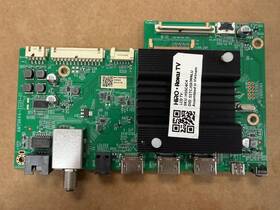
( Brand: Roku ), ( Manufacturer Part Number: 515CT9644M06Y ), ( Compatible Brand: For Roku ), ( Type: Main Board ), ( Unit Type: Unit ), ( Compatible Model: H55c4c4 )
Review ROKU Hiro M06y Main Board
The **Roku Hiro M06Y (Model: 515CT9644M06Y, Part Number: AM9644-ZC01-01)** is a high-performance, customizable motherboard designed specifically for the **Roku H55C4C4** series of streaming devices, catering to enthusiasts and developers seeking advanced functionality beyond standard Roku firmware. Built on a robust **AMT9644-ZC01-01** chipset, this board integrates cutting-edge hardware optimized for multimedia processing, offering a seamless experience for both casual users and tech-savvy individuals looking to push the boundaries of their Roku device. At its core, the Hiro M06Y features a **Quad-Core ARM Cortex-A53 processor**, clocked at high speeds to ensure fluid performance for 4K HDR content, smooth app navigation, and efficient multitasking, even when running third-party software or custom firmware. The board incorporates **2GB of LPDDR4 RAM**, providing ample memory for handling demanding applications, buffering high-resolution streams, and running multiple background processes without lag.
One of the standout features of the Hiro M06Y is its **expansive connectivity options**, making it ideal for integration into home entertainment systems or DIY projects. The board supports **HDMI 2.0a**, enabling 4K 60Hz and HDR10 playback with vibrant color accuracy and deep contrast ratios, while also accommodating Dolby Vision and Atmos for an immersive audio-visual experience. Additionally, it includes **USB 3.0 ports**, allowing for easy connectivity to external storage devices, game controllers, or peripherals, and supports **Wi-Fi 5 (802.11ac)** and **Bluetooth 4.2** for reliable wireless connectivity and audio streaming. For developers and tinkerers, the Hiro M06Y offers **debugging headers and GPIO pins**, facilitating custom firmware development, hardware modifications, and integration with other smart home ecosystems like Home Assistant, Alexa, or Google Assistant.
The design of the Hiro M06Y prioritizes **thermal efficiency and reliability**, featuring a **passive cooling solution** with strategically placed heat sinks to dissipate heat generated by the processor and other components. This ensures stable operation even during prolonged use or under heavy loads, such as continuous 4K streaming or running resource-intensive applications. The board also includes **dual-band Wi-Fi and Bluetooth antennas**, enhancing signal stability and reducing latency for a more responsive user experience. With its **compact yet feature-rich form factor**, the Hiro M06Y is designed to fit seamlessly into existing Roku setups while unlocking new possibilities for those willing to explore beyond the limitations of stock firmware.
Beyond its technical specifications, the Hiro M06Y embodies Roku s commitment to innovation and user flexibility, empowering users to customize their streaming experience. Whether for personal use such as running alternative interfaces, emulators, or media servers or for professional applications like digital signage or interactive installations, this board delivers the performance and versatility needed to transform a standard Roku device into a powerful, adaptable entertainment hub. For those invested in the Roku ecosystem or those looking to experiment with open-source firmware like **Rokube** or **RokuOS**, the Hiro M06Y serves as a gateway to unlocking advanced features, enhancing functionality, and tailoring the device to specific needs.
### Pros and Cons of buying a **Roku 515CT9644M06Y (Hiro M06Y, AM-T9644-ZC01-01) Board for the H55C4C4**
#### **Pros:**1. **Compatibility with H55C4C4** The Roku board is specifically designed to work with the H55C4C4, ensuring proper integration with the TV s hardware and software.
2. **Roku TV Experience** Provides access to Roku s streaming platform, which includes a vast library of apps (Netflix, Hulu, Prime Video, etc.), live TV options, and Roku s proprietary content.
3. **Remote Control & Voice Search** Comes with a Roku remote that supports voice search, making navigation easier.
4. **Regular Software Updates** Roku frequently updates its OS, improving performance, security, and adding new features over time.
5. **No Subscription Required for Basic Use** Unlike some smart TV platforms, Roku s core functionality is free, though premium apps may require subscriptions.
6. **Multi-Room Audio Support** If your H55C4C4 supports it, you can sync audio across multiple devices for a better sound experience.
7. **Backward Compatibility** Works with older Roku devices and streaming sticks if needed.
8. **Good for Streaming Purposes** Optimized for high-quality streaming with minimal lag, making it ideal for movies, shows, and live TV.
#### **Cons:**1. **Limited Customization** Unlike Android TV or webOS, Roku has fewer customization options, meaning you can t change the home screen layout or install third-party launchers.
2. **App Selection Depends on Roku s Choices** While Roku has a wide selection, some niche or regional apps may not be available compared to Android TV or Fire TV.
3. **No Full-OS Flexibility** You cannot install non-Roku apps (e.g., gaming apps, certain productivity tools) unless they are officially supported.
4. **Potential for Bloatware** Some Roku TVs come with pre-installed apps that cannot be removed, which may clutter the interface.
5. **Dependence on Roku s Ecosystem** If Roku s servers go down or there s an outage, streaming may be affected until the issue is resolved.
6. **No Built-in Gaming** Unlike some smart TVs, Roku does not support gaming consoles or emulators natively.
7. **Remote Battery Life** The included remote uses AA batteries, which will need replacing over time, adding minor maintenance.
8. **Potential for Higher Cost** If you re replacing an existing system, the cost of the Roku board may be a factor, especially if you already have a different smart TV platform.
---
### **Conclusion:**The **Roku 515CT9644M06Y board for the H55C4C4** is a solid choice if your primary goal is **streaming entertainment** with minimal hassle. It offers a user-friendly interface, strong app support, and regular updates, making it ideal for casual viewers who prioritize ease of use and a wide selection of streaming content. However, if you need **more customization, gaming, or third-party app flexibility**, alternatives like Android TV or Fire TV might be better.
For the **H55C4C4**, which is likely a budget-friendly TV, the Roku board provides a **cost-effective way to add smart features** without overcomplicating the setup. If you re satisfied with Roku s ecosystem and don t require advanced functionality, this is a **reliable and straightforward upgrade**.
### **Recommendation:** **Buy the Roku board if:**- You want a simple, no-frills streaming experience.
- You prefer Roku s app selection and interface.
- You don t need gaming, heavy customization, or third-party apps.
- You re okay with occasional reliance on Roku s servers for updates and streaming.
**Consider alternatives (e.g., Android TV stick or Fire TV Stick) if:**- You want more app flexibility or gaming options.
- You prefer a different UI or customization features.
- You re open to a slightly different streaming experience for additional functionality.
Overall, for most users looking to enhance their **H55C4C4 with smart features**, the Roku board is a **practical and well-supported choice**.
Details:
30 DAY WARRANTY BUYER PAYS FOR RETURN SHIPPING.
part #: 515ct9644m06y prices
- $10.99-$38.96
specifications tvboardgo:
- brand: Roku
- mpn: 515ct9644m06y
- compatible brand: For Roku
- type: Main Board
- unit type: Unit
- compatible model: H55c4c4
returns tvboardgo:
- method: Money back
- policy: Returns Accepted
- paid by: Buyer
- time: 30 Days
offer tvboardgo:
- sold: 0
- availability: In Stock
- options: Ship-to-home
- quantity: 1
- started: February 10, 2026
seller tvboardgo:
- rating: 99.7%
- # reviews: 20638
- city: Lilburn, Georgia
general tvboardgo:
- condition: Used
- TV, Video Home Audio > TV, Video Audio Parts > TV Boards, Parts Components
shipping tvboardgo:
- cost: $0.00
- transit: 3-8 Days
- class: Standard, Expedited
- service: Standard, USPS Priority Mail
- type: Fixed
- carrier: USPS
payments tvboardgo:
- wallet: Paypal
- other
- credit card: Discover
Roku 515CT9644M06Y Is Similar To:
- Tcl 40mst10fmaa2hg 40-mst10f-maa2hg Roku Main Board (25.4% similar) 40-MST10F-MAA2HG TLC Roku main board...(October 31st, 2023)
- Roku 031r1601f Oon.roku Circuit Board For Wifi 32 Inch Tv Model Number (35% similar) This is for a 32 inn.roku TV the was working great but fell off stand and cracked the screen. The board looks fine...(September 7th, 2024)
- Amtc Tv7002-zc02-01 Mail-in Repair Service For Onn Roku Element Power Supply Board (28.2% similar) Caution!!!, this part is an electrostatic-sensitive device eds. Any use of brand names and logos for this product is made solely purposes demonstrating an origin or compatibility. Please feel free to ask any questions about the service. Known TV model's: these boards are commonly found in LCD TVs ...(September 13th, 2024)
- Onn Tv7001zc0201 Roku Element M21 Power Supply Board 514c7001m21 Tv7001-zc02-01 (27.4% similar) Part #: inn TV7001ZC0201 for sale...(October 12th, 2024)
- Onn Roku Pltvjj361xacr 100005397-t Tv Power Supply Board (24.4% similar) This genuine power supply board is tested, fully functional, and ready for your repair needs. Brand: inn Roku, model: 100005397-T, part type: power supply board, #: PLTVJJ361XACR, cross reference x PLTVJJ361XACR, 4503136, 715GA086-P01-001-003M, JJ361XACR, compatible TVs: Roku 100005397-T. Notes: ...(January 29th, 2025)
- Roku 65r6a5x-m24 65r6a5x 65r6ax Main Board 515c90102m24 Mt90102-zc01-01 (37.7% similar) Board number: MT90102-ZC01-01. Parts are new or like. Part type: main board. Part number: 65R6A5X-M24 / 515C90102M24. Part info: brand: Roku. Compatible model's: 65R6A5X / 65R6AX. Circuit boards do not include any manufacturer packaging and may show signs of prior installation. Otherwise this board ...(February 21st, 2025)
- Element Tv6505zc0201 Roku Tv Power Board Tv6505-zc02-01 (27.9% similar) The part was removed from a cracked screen TV. The part was tested and is in perfect working order...(February 24th, 2025)
- Onn M08-tp40030-0701n-5318a 3 Roku Tv Led Oem Backlight Strips For 1000597810 M08-tp40030-0701n-5433a (23.8% similar) This product is a set of three inn Roku TV led oem back light strips designed for model 100058007 manufactured in 2022 . They are compatible with inn brand TVs and specifically for model , part number M08-TP40030-0701N-5433A...(February 24th, 2025)
- Roku 20230702 55r6a5r 55r6ax Main Board Mt90102-zc01-01 (34.4% similar) Roku main board...(March 4th, 2025)
- Roku 514c6507m16 Power Supply Board (35.3% similar) Inn Roku TV MOD:10012587 selling the power board...(March 4th, 2025)
- Onn Rt28211zc0101 Roku Smart Tv Main power Supply Board Rt28211-zc01-01 (29% similar) Roku smart TV main/power supply board RT28211-ZC01-01. Condition is used. Shipped with USPS ground advantage...(March 6th, 2025)