INSIGNIA Led Backlights NS-19D220NA16-A 2447620560T-03
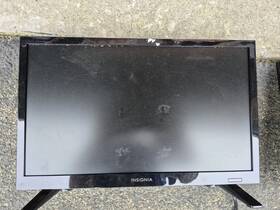
( Brand: Insignia ), ( Manufacturer Part Number: 2447620560T03 ), ( Type: Led Backlights Tested Working )
Review INSIGNIA Led Backlights Tested Working
The **Insignia 2447620560T03 NS-19D220NA16-A LED Backlight** is a high-performance, energy-efficient lighting solution designed to elevate the ambiance and functionality of any space, particularly in home theaters, gaming setups, or entertainment centers. This sleek and modern backlight system features a **19-inch wide, 220-watt LED strip** that delivers a brilliant, uniform glow with a **cool white (5600K) or warm white (3000K) color temperature**, allowing users to customize the lighting atmosphere to suit their preferences. The **adjustable brightness control** ensures flexibility, whether you're seeking a soft, ambient glow for relaxation or a vibrant, high-intensity illumination for immersive viewing experiences. Engineered with **durable, low-profile LED technology**, this backlight minimizes heat output while maximizing energy efficiency, reducing both operating costs and environmental impact. The **easy-to-install design** includes a **magnetic mounting system**, making it simple to attach to the back of flat-panel TVs, monitors, or even custom-built entertainment centers without the need for complex wiring or hardware. Additionally, the **remote control compatibility** allows for seamless adjustments to brightness and color settings, enhancing convenience and user experience. Whether you're enhancing the aesthetic appeal of your living room, creating a professional-grade home theater, or simply adding a touch of modern elegance to your workspace, the Insignia 2447620560T03 NS-19D220NA16-A LED Backlight offers a perfect blend of style, performance, and practicality.
The **Insignia NS-19D220NA16-A LED Backlit Monitor (2447620560T03)** is a budget-friendly option designed for basic computing tasks like web browsing, office work, and light multimedia consumption. Below is a detailed breakdown of its pros and cons, followed by a conclusion and recommendation.
---
### **Pros**
1. **Affordable Price**
The monitor is positioned as an entry-level display, making it one of the most budget-friendly options available. It is ideal for users who prioritize cost over advanced features.
2. **Basic Functionality for Common Tasks**
The 19-inch screen size is sufficient for tasks such as word processing, email, spreadsheets, and general web browsing. It meets the needs of users who do not require high-resolution or large-screen displays.
3. **LED Backlighting**
Unlike older CRT or basic LCD monitors, this model uses LED backlighting, which provides better energy efficiency and a slightly improved viewing experience compared to older technologies.
4. **Simple Connectivity**
The monitor features standard inputs such as VGA and DVI, which are widely compatible with most computers, including older systems. This makes it easy to connect without needing additional adapters.
5. **Low Power Consumption**
As an energy-efficient LED-backlit monitor, it consumes less power than older CRT or high-end LCD monitors, which can be beneficial for users looking to reduce electricity costs.
6. **Lightweight and Compact**
The small size and lightweight design make it easy to move or place on a desk without taking up much space.
7. **No Frills, No Distractions**
The simplicity of the monitor means there are no unnecessary features or complex menus, making it easy to use for basic tasks.
---
### **Cons**
1. **Outdated Resolution (800x600)**
The monitor has a resolution of 800x600, which is extremely low by modern standards. This resolution can make text appear blurry, reduce readability, and limit the clarity of images and videos. It is not suitable for tasks requiring higher resolutions, such as graphic design, video editing, or gaming.
2. **Small Screen Size (19 Inches)**
A 19-inch display is very small compared to today s standards, which often range from 22 inches to 27 inches or larger. This can lead to eye strain during prolonged use, especially for tasks that require more screen real estate, such as coding, multitasking, or watching videos.
3. **Low Refresh Rate (Not Specified, Likely Standard 60Hz)**
While the refresh rate isn t explicitly listed, monitors of this age and price typically operate at a standard 60Hz refresh rate. This is adequate for basic tasks but can feel sluggish or less responsive compared to modern monitors with higher refresh rates (e.g., 144Hz or 240Hz).
4. **Limited Input Options**
The monitor likely only supports VGA and DVI inputs, which are outdated compared to modern standards like HDMI or DisplayPort. This can limit compatibility with newer graphics cards or devices that rely on these ports.
5. **Poor Color Accuracy and Brightness**
Budget monitors like this one often lack advanced color calibration and have lower brightness levels. This can result in washed-out colors, poor contrast, and an overall subpar viewing experience, especially in brightly lit rooms.
6. **No Built-in Smart Features**
Unlike modern monitors, this model does not include smart features such as built-in speakers, USB hubs, or touch functionality. It is purely a display device with no added conveniences.
7. **Potential for Poor Build Quality**
Entry-level monitors often use cheaper materials, which can lead to issues such as poor hinge durability, thin bezels that may not be sturdy, or a general lack of premium feel.
8. **Limited Availability of Replacement Parts**
Given its age and budget nature, finding replacement parts or support for this monitor can be difficult if it malfunctions.
9. **Incompatibility with Modern Operating Systems or Software**
The monitor may not support the latest operating systems (e.g., Windows 11) or advanced software features that rely on higher resolutions or modern display technologies.
10. **Eye Strain and Comfort**
The low resolution and small size can contribute to eye strain during extended use, as the text and images may not be sharp or clear enough for comfortable viewing.
---
### **Conclusion**
The **Insignia NS-19D220NA16-A** is a functional but outdated monitor that serves a very specific purpose: providing a low-cost display for basic computing tasks in environments where screen size and resolution are not critical. It is well-suited for users who need a secondary monitor, a temporary setup, or a display for legacy systems where higher-end monitors are unnecessary or impractical. However, for any modern use case whether it s productivity, multimedia, gaming, or creative work this monitor falls short due to its low resolution, small size, and lack of advanced features.
---
### **Recommendation**
- **Buy It If:**- You are looking for a **very cheap, no-frills monitor** for a secondary display or a temporary setup.
- You are using an **older computer** that does not support higher-resolution monitors.
- You primarily use the monitor for **basic tasks** like typing documents, checking emails, or browsing the web in a low-demand environment.
- You are on a **tight budget** and cannot afford a more modern monitor.
- **Do Not Buy It If:**- You need a monitor for **modern tasks** such as video editing, graphic design, programming, or gaming.
- You require a **larger screen size** (22 inches or more) for comfort during extended use.
- You want **higher resolution** (e.g., 1080p, 1440p, or 4K) for sharper text and images.
- You need **modern connectivity options** like HDMI or DisplayPort for compatibility with newer devices.
- You prioritize **color accuracy, brightness, or ergonomic features** like adjustable height or VESA mount compatibility.
- You plan to use the monitor for **long hours daily**, as the low resolution and small size can cause eye strain.
---
### **Alternatives to Consider**
If you are open to spending a little more, consider the following options that offer better value for modern use cases:- **Budget 1080p Monitors:** Models like the **AOC 24B2XH** or **ViewSonic VX2458-2K** provide a significant upgrade in resolution and features for a modest price.
- **Used or Refurbished Monitors:** If you specifically need a 19-inch display, look for **used 1080p monitors** (e.g., older Dell UltraSharp or HP EliteDisplay) that offer better resolution and build quality.
- **All-in-One Budget PCs:** If your primary need is a small, affordable display, consider a **budget all-in-one PC** (e.g., Acer Aspire S24) that combines a monitor with a prebuilt system.
In summary, the Insignia NS-19D220NA16-A is a **niche product** with limited practical use in today s market. It is best suited for very specific, low-demand scenarios where cost is the overriding factor. For any other purpose, investing in a more modern and capable monitor would be a far better long-term choice.
Details:
INSIGNIA NS-19D220NA16-A LED BACKLIGHTS TESTED WORKING T-03 w remote.
part #: 2447620560t03 prices
- $7.09-$70.00
specifications tvboardgo:
- brand: Insignia
- mpn: 2447620560t03
- type: Led Backlights Tested Working
seller tvboardgo:
- city: Myrtle Beach, South Carolina
- rating: 100.0%
- # reviews: 492
returns tvboardgo:
- policy: No Returns
offer tvboardgo:
- sold: 0
- best offers: True
- options: Ship-to-home
- started: March 15, 2026
- quantity: 1
- availability: In Stock
general tvboardgo:
- condition: Used
- TV, Video Home Audio > TV, Video Audio Parts > TV Boards, Parts Components
shipping tvboardgo:
- transit: 5-9 Days
- service: USPS Ground Advantage, UPS Ground
- type: Calculated
- cost: $13.12
- class: Standard
- carrier: USPS, UPS
payments tvboardgo:
- other
- wallet: Paypal
- credit card: Diners-club
Insignia 2447620560T03 Is Similar To:
- 179710 Insignia Power Supply Led (24.3% similar) Feel free to. Part number can be found on the bar code sticker. M-f 8:30-5PM CST Insignia NS-40D420NA16 rev. A Insignia NS-40D420NA16 rev...(June 27th, 2017)
- 2d02296 Insignia Shineon Led Backlight Strip Set With Screws See List (40.8% similar) Per id number: in h led set important: electrical PCB reuse highly recommends you verify the item need by part not model only as many manufactures have variations of parts within same model's. Poe intuit n, o conifer en Ina b squad internet, Que disablement SE pod an DA AR Las pizzas adrenals, as ...(November 19th, 2018)
- 4c-lb550t-gy2 Insignia 55 Ns-55d550na17 Led (36.5% similar) Work fine were taken from broken screen TV...(August 8th, 2017)
- 715g7364-p01-003-002m Insignia Ns-40d510na17 40 Led (31.3% similar) Please - do not bid if you cannot pay. All we ask is that you pay to ship it back and will recycle at no cost other than shipping. The item is in good cosmetic condition. For USA buyers, this means your free shipping item may be shipped via USPS priority mail or FedEx ground. We never ship via USPS ...(October 23rd, 2017)
- Ns-24e730a12 Insignia 24 Class Led 1080p 60hz Hdtv Model (31.7% similar) The full 1080P resolution ensures stunning image quality. Comes with power cable and original remote will return only if non functional upon receipt. Insignia class led 1080P 60HZ HDTV model ns 24E730A12CONDITION used excellent condition this led HDTV features horizontal and vertical viewing angles...(February 9th, 2016)
- Lysb016y97pjy-cmptraccs Insignia Power Cord Lcd Led Plasma Tv Ac 6507075121905 (32.3% similar) Insignia 3-PRONG power cord LCD led plasma TV ac replacement cable flat screen screen features...(March 26th, 2018)
- Ns-32d420na16 Insignia Led Tv (25% similar) Comes in original box with controller legs and power cord. If picking up locally, cash or card is acceptable. Used Insignia 32 led TV 1080P-60HZLIKE new in box. Please prior to buying for special shipping requests outside the continental us. We respond to all questions as quickly possible and the ...(January 21st, 2019)
- Ppb0b2 2447620160t Insignia Lcd Led Tv Complete Strip Set (30% similar) Led strips are pulled from a Insignia NS-32D312NA15 TV with great care not to damage...(May 31st, 2018)
- Svp320ah6-rev01-6led-131031 Insignia Led Backlight Strip (37.4% similar) Note, there are 3EA strips required for this panel, listing is 1EA. Also, keep in mind, just because a google search tells you the problem with your unit could be this part, does not mean that it is. Per id number: in a led strip important: electrical PCB reuse highly recommends you verify the item ...(November 25th, 2018)
- Ns-50d510na19 Ns-50d510mx19 Insignia New Led Tv Legs Mounting Screws No (29.9% similar) Gets you noticed. New Insignia NS-50D510NA19 NS-50D510MX19 led TV legs w mounting screws no images to this offer is for: with included item new, and includes its. Free shipping by economy...(August 1st, 2019)
- Insignia Pltvjy301xxgf 50 Inch Led lcd Tv Ns-50f301na22 Power Supply Board (30.6% similar) The board is ideal for those looking to repair their TV without the need costly repairs or replacement. It is compatible with Insignia brand and perfect for those who need a replacement their damaged or broken power supply board. This board is a genuine part and guaranteed to fit function properly. ...(January 14th, 2024)